APP-6 is the NATO standard for military map symbols. The US version, MIL-STD-2525, looks almost the same. This page covers the parts a MilSim unit uses most, not the whole standard.
The frame: whose side
| Shape | Colour | |
|---|---|---|
| Friendly | Rectangle | Blue |
| Hostile | Diamond | Red |
| Neutral | Square | Green |
| Unknown | Four-leaf clover | Yellow |
The shape carries the meaning on its own, so a symbol still reads in black and white or for a colour-blind player. A solid frame means the unit is there now. A dashed frame means it is planned or suspected, such as where you expect the enemy reserve to show up.
The marks above the frame: how big
| Mark | Typical size | |
|---|---|---|
| Team or crew | Ø (circle with a slash) | A few players, or one vehicle crew |
| Squad | • | 8 to 13 |
| Section | •• | Two squads or teams |
| Platoon | ••• | About 30 to 50 |
| Company | I | About 100 to 200 |
| Battalion | II | Several companies |
| Regiment | III | Several battalions |
| Brigade | X | Several battalions or regiments |
Most MilSim ops sit between team and platoon. Use the mark for what the element is in your op, not for the size of your whole unit.
The icon inside: what kind of unit
| Icon inside the frame | |
|---|---|
| Infantry | An X from corner to corner |
| Armour | An oval, like a tank track |
| Mechanized infantry | The infantry X with the armour oval |
| Reconnaissance | One diagonal line, bottom left to top right |
| Artillery | A filled dot in the centre |
| Anti-armour | An upside-down V |
| Medical | A plus-shaped cross |
Extra marks and text
- Headquarters: a short staff line hangs down from the bottom left of the frame.
- Task force: a bracket over the size mark, for a unit put together for this op.
- Feint or dummy: a dashed V over the frame, for a unit that is there to deceive.
- Text around the frame: the unit's name (2PLT), its higher unit, a count of vehicles or people, and a date-time group (DTG) such as 311430ZOCT26, which reads as day 31, 14:30 Zulu, October 2026.
A unit does not need the whole standard. Agree on the frames, the size marks, and the ten or so icons you actually use, and keep labels short.
How TacOps does this step
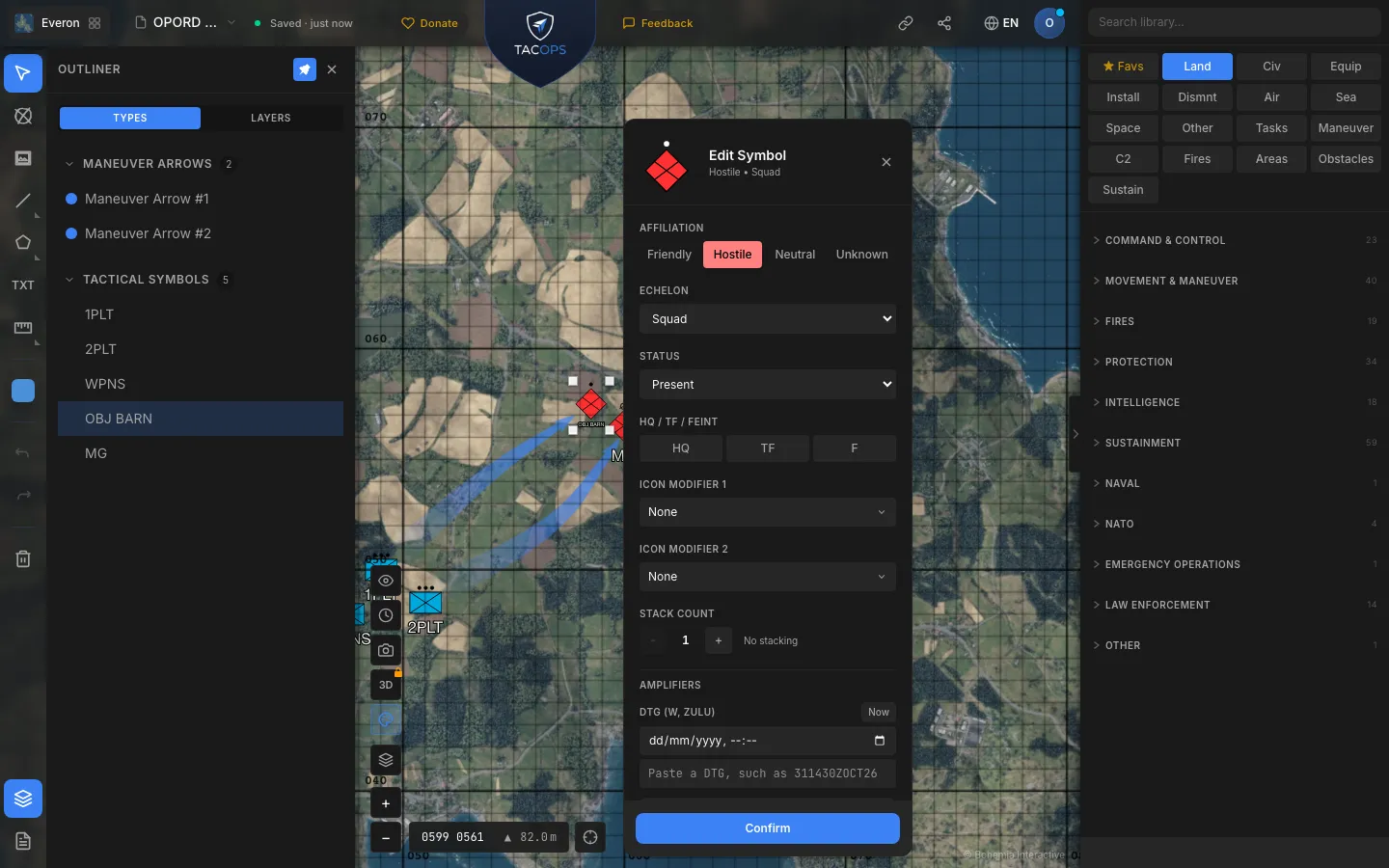
TacOps builds APP-6 symbols for you. Pick one from the symbol library, which groups land units, equipment, installations, air, sea, and tactical tasks, and drop it on the map. The edit panel sets the affiliation, the size, present or planned, HQ, task force, and feint, plus icon modifiers, a stack count, and text fields such as the DTG. On a shared plan, anyone who taps a symbol sees its affiliation and size spelled out, so new players can read the map before they know the marks.
More guides: how to write an op order, NATO map symbols explained, and how to brief on a phone.